
Sign-up, login and support
Valhally Account
From the registration form to the Forgot your password link, this page covers opening a Valhally account, signing in, and recovering access after a problem. Further down are the support addresses and the help available in the UK if gambling stops being fun.
Registration
Registration, stage by stage
You will find Register at the upper right of each page. It opens a window with several stages, and the first one is short, ending with Next Step. At the top, under Choose Bonus, you say whether you have a promocode or want no bonus. No Bonus is selected in advance.
| Field | Required | What to enter |
|---|---|---|
| Yes | Your address, activated later through a link | |
| Password | Yes | Between 6 and 32 characters, using both letter cases plus a digit |
| Age and terms | Yes | One box confirming your age (18 or older) plus agreement to the terms and privacy rules |
| Marketing | No | Consent to email, SMS and phone offers |
| Promocode | No | Only if you have one |
Social logins through Google or Apple are not offered. One account per person is the rule, and extra accounts can be shut with their payouts cancelled. After registering, activate your email and fill in the profile, otherwise no bonus can be credited.
Logging in
The login screen
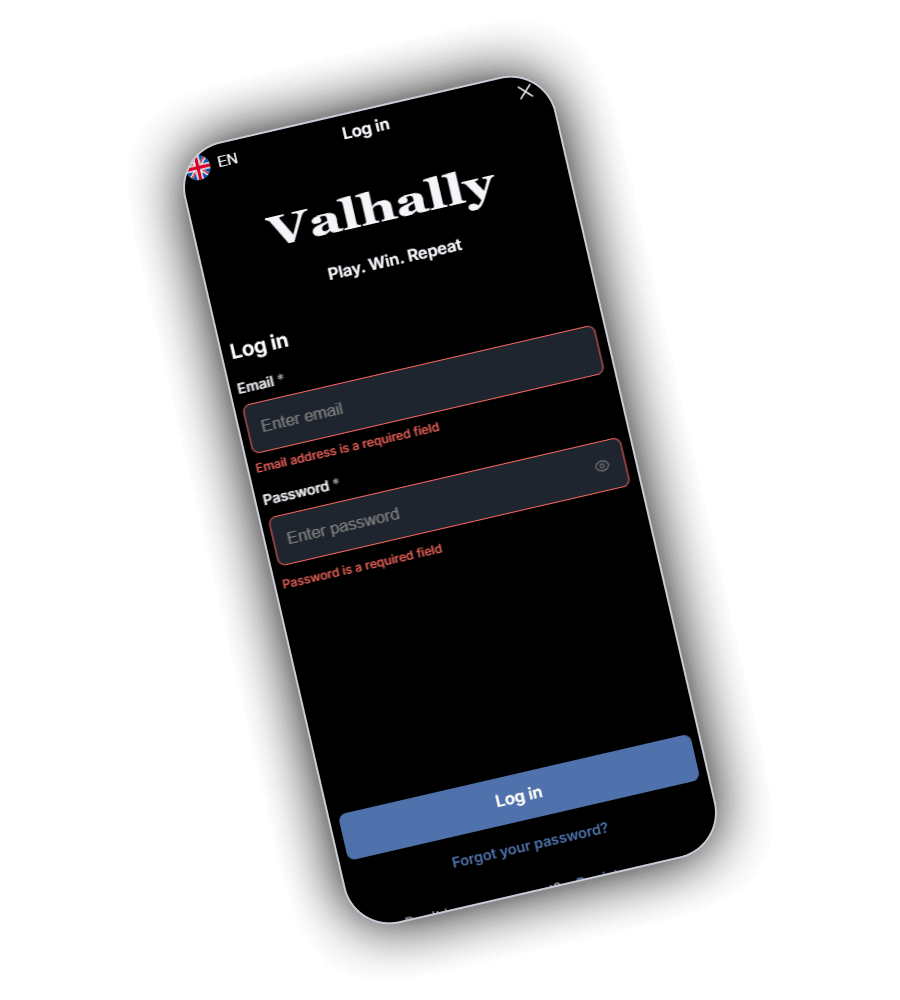
Press Log in and a dark screen appears with the logo and the line Play. Win. Repeat. Beneath it are two boxes, Email and Password. Leave either empty and a red note under the box tells you the field is required. The eye icon beside the password reveals what you typed, which helps on a small keyboard.
Below the boxes is a blue Log in button, and below that the Forgot your password link. The flag in the top corner changes the language.
- The home screen app uses the identical login.
- Balance, bonuses and tier progress are the same on every device.
- Games only start once you are logged in, even if you just want to browse.
Help
When the login fails
| Problem | What helps |
|---|---|
| Forgotten password | Press Forgot your password and follow the email |
| Email not arriving | Check junk mail and confirm the address you typed |
| Account blocked | Email support, as a pending verification is often the cause |
| Silence after a payout request | After 14 days without a reply from you, Valhally may lock access |
| Fees after a long break | Log in at least once a year to avoid the monthly €10 charge |
| Self-exclusion still running | Wait for it to end or ask support about lifting it early |
Give this account a password you use nowhere else. Valhally asks for at least six characters, but twelve or more with a few symbols is far harder to guess. Keep your login to yourself, because the account is personal and whatever happens on it is your responsibility.
Support
Getting hold of Valhally support
- General help
- [email protected]
- Self-exclusion
- [email protected]
- Live chat
- On the website once logged in
- VIP members
- Messenger apps and priority handling
- Phone
- No number published
- Complaints
- Raise within one year
Valhally has no public help centre or FAQ and no social media accounts. Opening hours and support languages are not stated. A complaint starts with customer service, which escalates anything unresolved internally, and complaints are accepted from the account holder only. In a dispute about a game result, the server logs have the final word.
Safer gambling
Limits, breaks and help in the UK
The Responsible Gambling page at Valhally carries a seven-question self-test answered with yes or no. You can ask for a stake limit, and any new change waits 24 hours after the last one before it applies. For a break or a longer block, email [email protected] and say how long you want.
- When a temporary exclusion ends the account reopens, unless you ask at least 24 hours in advance for an extension or a permanent block.
- Early lifting of an exclusion can be requested, with the final call resting with Valhally.
- Outside help listed there: GamCare, plus Gamblers Anonymous and Gambling Therapy.
- Parents are pointed to blocking tools, for example Cyber Patrol or Net Nanny.
Because Valhally operates without a British licence, it sits outside GamStop and any block must be asked for by email. GamCare takes calls free of charge around the clock on 0808 8020 133, and offers chat and WhatsApp too at gamcare.org.uk.
How do I open a Valhally account?
Tap Register, enter your email, pick a password (6 to 32 characters), tick the box for age and terms, then press Next Step. The promocode or No Bonus choice sits above those fields.
How do I reset a lost Valhally password?
Forgot your password sits just under the Log in button. A reset email follows. If nothing arrives, check your spam folder.
Does Valhally have a phone number?
No. Support is by email at [email protected] and by live chat on the site. VIP members also get messenger support and priority.
Does GamStop block me at Valhally?
No. No. GamStop only covers British licensed operators. For a block at Valhally, send an email to [email protected] naming the period.